


While developing an application that will be hosted on Azure Service Fabric and adding a .NET Standard library or project, Visual Studio might display a warning like this one:
[su_quote]Warning MSB3270 There was a mismatch between the processor architecture of the project being built “MSIL” and the processor architecture of the reference “C:\[…]”, “AMD64”. This mismatch may cause runtime failures. Please consider changing the targeted processor architecture of your project through the Configuration Manager so as to align the processor architectures between your project and references, or take a dependency on references with a processor architecture that matches the targeted processor architecture of your project.[/su_quote]
Turned out that the problem is that the only supported platform for Azure Service Fabric is x64 so you receive that warning when your target CPU for building is AnyCPU. The library will probably work anyway but to solve that problem you must either choose x64 as a target in the Build section
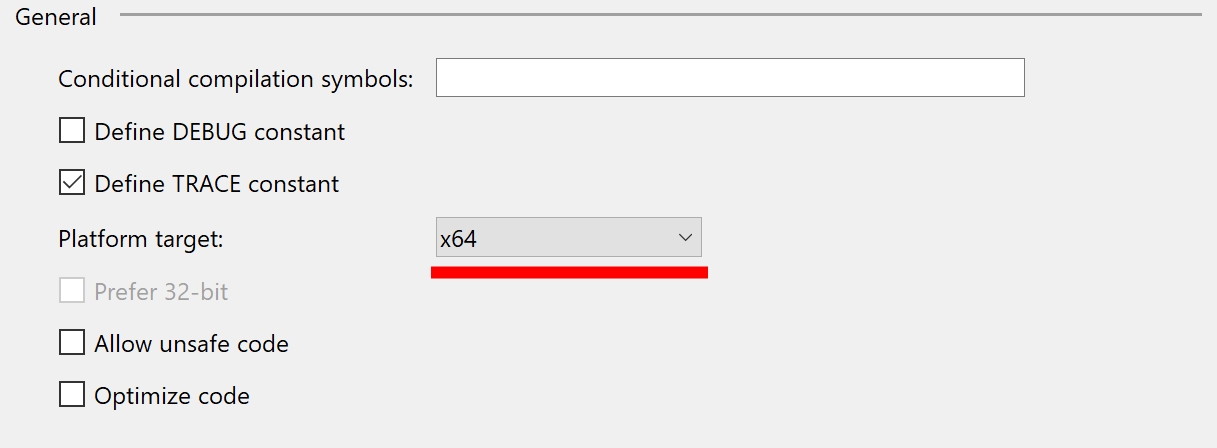
or set the target processor architecture inside the .csproj file:
<PropertyGroup>
    <TargetFramework>netcoreapp2.0</TargetFramework>
    <PlatformTarget>x64</PlatformTarget>
    <RootNamespace>Microsoft.*.Tests</RootNamespace>
</PropertyGroup>
Save the file and build the library again: you should not see those warnings anymore.
Switching target processor architecture obviously makes that library unusable in 32bit context, something that you should be aware of.
